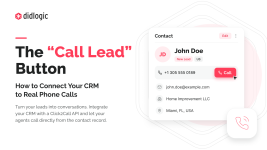



Getting a lead into your CRM is straightforward. Making sure the right person can call that lead without switching between several tools is another story.
For a small campaign, this may not seem important. Someone opens the CRM, copies a phone number, pastes it into a dialer, and makes the call. But as operations grow, that process becomes harder to manage.
Imagine a lead generation business running campaigns across several GEOs. Leads arrive from landing pages, different agents handle different markets, and each contact needs to be called during the appropriate local hours. The team already has a CRM. It already has people handling calls. What it may be missing is a straightforward connection between the two.
This is where CRM-based Click2Call can be useful.
Afterward, the agent returns to the CRM to update the lead's status. None of these steps is particularly difficult. The problem is that they create unnecessary manual work.
A few things can happen:
A simplified workflow looks like this:
CRM contact → Click “Call” → Agent answers → Customer is dialed → Both parties are connected
This approach is called agent-first calling. The agent doesn't have to manually enter the customer's number, and the customer isn't dialed before the selected agent answers. It doesn't guarantee that the customer will pick up or that the conversation will result in a sale. It simply makes the connection between the CRM and the calling infrastructure more straightforward.
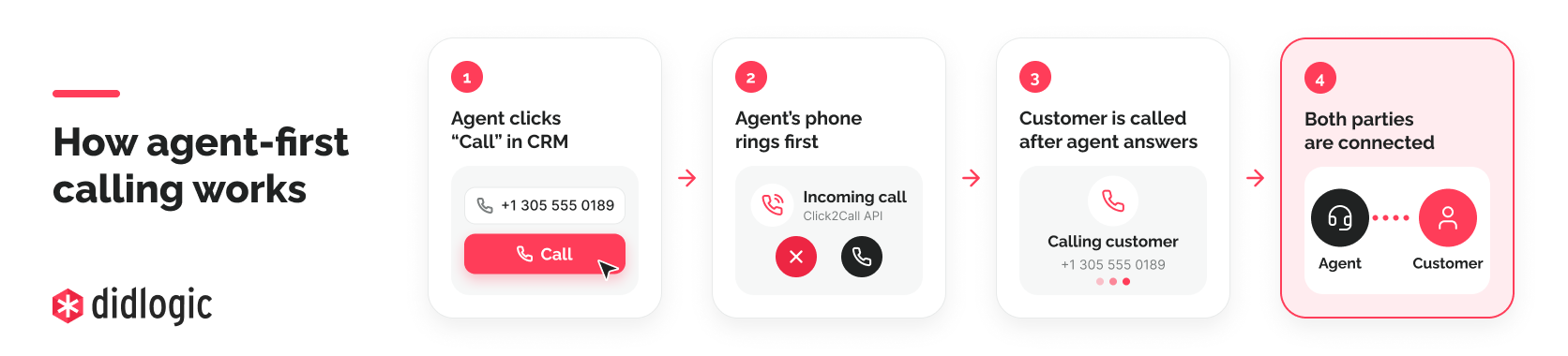
At didlogic, our Click2Call API uses this approach. It can connect to an agent's SIP account first, then dial the customer's number and bridge the call.
For example, a CRM might contain a number saved in a local format, without a country code. That may be understandable to a human agent but unsuitable for an automated international calling request. Before connecting a CRM to a calling API, check how phone numbers are stored, validated, and formatted.
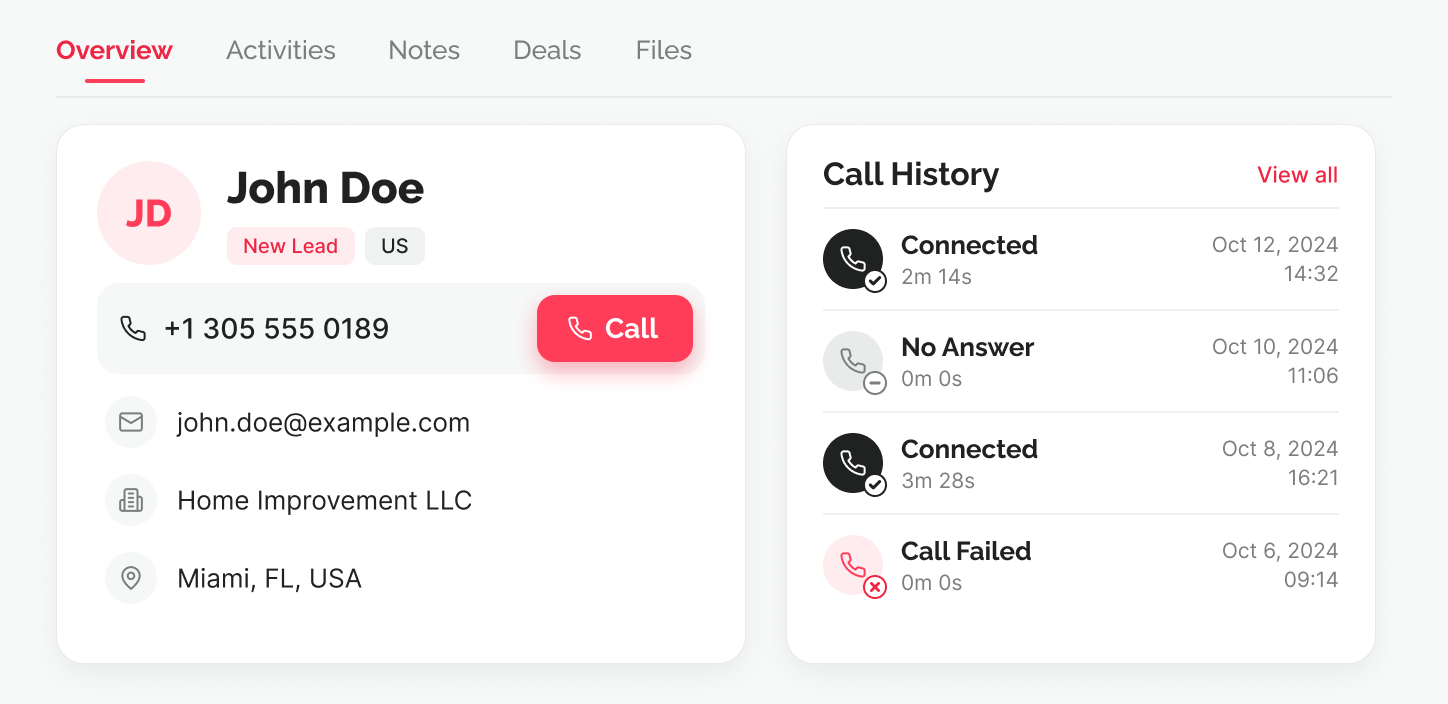
A company generates leads for home improvement services in several markets. Its agents work in different shifts, and the CRM assigns incoming leads based on geography and availability. An agent opens a new lead assigned to them.
The customer has requested contact, the phone number has been validated, and the scheduled calling window is appropriate. The agent clicks Call. The CRM sends a request to the calling API, which starts by ringing the agent's SIP account. Once the agent answers, the customer's phone begins ringing. If the customer answers, they are connected.
After the attempt, the CRM can use call status data to update the contact record. If the customer doesn't answer, the lead may remain in a follow-up queue. If the connection succeeds, the agent can record the qualification outcome. The important distinction is that the telecom system handles the phone connection, while the CRM and the business's own workflow still handle lead assignment, follow-ups, and qualification. Neither system automatically replaces the other.
1. Who is allowed to initiate a call?
Decide which users should have calling permissions and how their CRM accounts map to SIP accounts. This matters when several agents share the same lead database.
2. How will the right agent be selected?
An agent-first call ensures that the designated agent answers before the customer is dialed. But your workflow still needs to select the correct agent and check whether they should be receiving calls.
3. Which caller ID will the customer see?
Don't assume that a CRM integration automatically provides a local number in every GEO. The caller ID presented to the customer depends on the calling account configuration, available numbers, and applicable requirements. Confirm your setup before running campaigns in a new country.
4. What happens if an agent clicks twice?
Your CRM should handle repeated button clicks and uncertain network responses carefully. A simple safeguard is to show that a call is already being initiated. More sophisticated integrations may also need server-side controls to prevent accidental duplicate requests.
5. Where will call results be stored?
Decide which information is useful to the team. For example, you may want the CRM to distinguish an initiated call, a successfully bridged conversation, and a failed attempt. The business should also record the actual outcome of the conversation separately. A connected call doesn't automatically mean a qualified lead or a sale.
With an API-based Click2Call workflow, the calling service contacts the agent's existing SIP endpoint and then connects the customer. The agent doesn't necessarily need a phone interface embedded in the CRM. With a browser-based voice solution, the agent can place and receive calls directly inside the web application. The better option depends on how the team already works.
If agents are comfortable using their existing SIP phones or softphones, an API-based integration may fit naturally into their workflow. If the goal is to build a full calling experience inside a custom CRM, a browser voice SDK may be more appropriate. There's no need to build a new dialer interface if the business only needs an easier way to initiate calls.
The API follows the agent-first model: it connects to the agent's SIP account, calls the customer after the agent answers, and bridges the two sides.
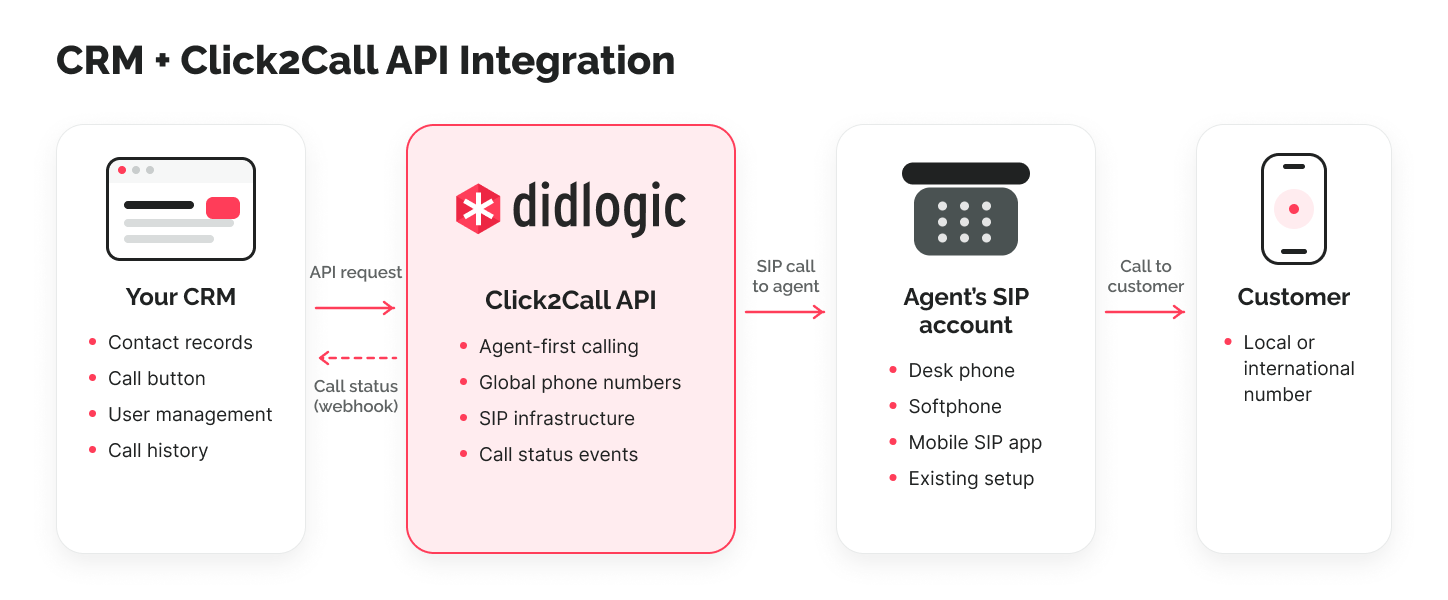
Call progress can be checked through the API or followed through optional webhooks. This can help developers connect telephony events with CRM records and internal workflows.
For example, didlogic provides a Zoho CRM integration guide showing how to add a calling button to contact records.
For custom applications and other CRMs, the Click2Call API documentation explains the request structure, call states, and integration options. The API provides the underlying call connection. Lead distribution, customer permissions, follow-up rules, and business reporting remain part of the application or CRM using it.
For those running lead generation campaigns or managing call centers:
How does your team currently call leads — directly inside the CRM, through an external dialer, or by manually copying phone numbers? And what's the biggest limitation of your current setup? Interested to hear how different teams are handling this.
For a small campaign, this may not seem important. Someone opens the CRM, copies a phone number, pastes it into a dialer, and makes the call. But as operations grow, that process becomes harder to manage.
Imagine a lead generation business running campaigns across several GEOs. Leads arrive from landing pages, different agents handle different markets, and each contact needs to be called during the appropriate local hours. The team already has a CRM. It already has people handling calls. What it may be missing is a straightforward connection between the two.
This is where CRM-based Click2Call can be useful.
1. Why manual dialing becomes a problem
Consider a typical sales or lead qualification workflow. A new lead appears in the CRM. An agent opens the contact record, finds the phone number, switches to the company's calling software, enters the number, and starts the call.Afterward, the agent returns to the CRM to update the lead's status. None of these steps is particularly difficult. The problem is that they create unnecessary manual work.
A few things can happen:
- The agent copies the wrong number or leaves out the country code.
- The contact gets called twice because another team member is handling the same lead.
- The call takes place, but its result never gets recorded in the CRM.
- The agent spends more time switching between systems than necessary.
2. What if the agent could simply click “Call”?
Instead of copying a number into another tool, the agent opens the contact record and clicks a button. The CRM initiates the calling process, and the agent receives the call on their existing phone or softphone. Once the agent answers, the system calls the customer and connects the two.A simplified workflow looks like this:
CRM contact → Click “Call” → Agent answers → Customer is dialed → Both parties are connected
This approach is called agent-first calling. The agent doesn't have to manually enter the customer's number, and the customer isn't dialed before the selected agent answers. It doesn't guarantee that the customer will pick up or that the conversation will result in a sale. It simply makes the connection between the CRM and the calling infrastructure more straightforward.
3. What does the CRM actually need?
A button alone isn't enough. Several things need to work together behind it.A way to initiate calls
The CRM needs a connection to a calling service. One approach is to use a Click2Call API. When the agent clicks the button, the CRM or its backend sends a request containing the information required to place the call.At didlogic, our Click2Call API uses this approach. It can connect to an agent's SIP account first, then dial the customer's number and bridge the call.
A registered agent endpoint
The system needs to know where to reach the agent. That might be a desk phone, softphone, mobile SIP application, or another compatible endpoint connected to the agent's SIP account. The agent can continue using their existing calling setup rather than learning an entirely new interface.Correct customer phone numbers
International campaigns need special attention here.For example, a CRM might contain a number saved in a local format, without a country code. That may be understandable to a human agent but unsuitable for an automated international calling request. Before connecting a CRM to a calling API, check how phone numbers are stored, validated, and formatted.
Call status information
A successful API request does not mean the customer answered. The system should be able to distinguish a call that was initiated from one that actually connected. This allows the CRM to reflect what happened rather than marking every click as a completed conversation.4. A practical example: a lead generation team working across GEOs
Let's use a hypothetical example.A company generates leads for home improvement services in several markets. Its agents work in different shifts, and the CRM assigns incoming leads based on geography and availability. An agent opens a new lead assigned to them.
The customer has requested contact, the phone number has been validated, and the scheduled calling window is appropriate. The agent clicks Call. The CRM sends a request to the calling API, which starts by ringing the agent's SIP account. Once the agent answers, the customer's phone begins ringing. If the customer answers, they are connected.
After the attempt, the CRM can use call status data to update the contact record. If the customer doesn't answer, the lead may remain in a follow-up queue. If the connection succeeds, the agent can record the qualification outcome. The important distinction is that the telecom system handles the phone connection, while the CRM and the business's own workflow still handle lead assignment, follow-ups, and qualification. Neither system automatically replaces the other.
5. Five things to check before adding Click2Call to your CRM
If you're considering this type of setup, here are five practical questions worth answering before development starts.1. Who is allowed to initiate a call?
Decide which users should have calling permissions and how their CRM accounts map to SIP accounts. This matters when several agents share the same lead database.
2. How will the right agent be selected?
An agent-first call ensures that the designated agent answers before the customer is dialed. But your workflow still needs to select the correct agent and check whether they should be receiving calls.
3. Which caller ID will the customer see?
Don't assume that a CRM integration automatically provides a local number in every GEO. The caller ID presented to the customer depends on the calling account configuration, available numbers, and applicable requirements. Confirm your setup before running campaigns in a new country.
4. What happens if an agent clicks twice?
Your CRM should handle repeated button clicks and uncertain network responses carefully. A simple safeguard is to show that a call is already being initiated. More sophisticated integrations may also need server-side controls to prevent accidental duplicate requests.
5. Where will call results be stored?
Decide which information is useful to the team. For example, you may want the CRM to distinguish an initiated call, a successfully bridged conversation, and a failed attempt. The business should also record the actual outcome of the conversation separately. A connected call doesn't automatically mean a qualified lead or a sale.
6. Click2Call API or browser-based calling?
These are related approaches, but they aren't the same thing.With an API-based Click2Call workflow, the calling service contacts the agent's existing SIP endpoint and then connects the customer. The agent doesn't necessarily need a phone interface embedded in the CRM. With a browser-based voice solution, the agent can place and receive calls directly inside the web application. The better option depends on how the team already works.
If agents are comfortable using their existing SIP phones or softphones, an API-based integration may fit naturally into their workflow. If the goal is to build a full calling experience inside a custom CRM, a browser voice SDK may be more appropriate. There's no need to build a new dialer interface if the business only needs an easier way to initiate calls.
7. How didlogic fits into this setup
At didlogic, we've introduced a Click2Call API for businesses that want to initiate phone calls from their own applications and backend systems.The API follows the agent-first model: it connects to the agent's SIP account, calls the customer after the agent answers, and bridges the two sides.
Call progress can be checked through the API or followed through optional webhooks. This can help developers connect telephony events with CRM records and internal workflows.
For example, didlogic provides a Zoho CRM integration guide showing how to add a calling button to contact records.
For custom applications and other CRMs, the Click2Call API documentation explains the request structure, call states, and integration options. The API provides the underlying call connection. Lead distribution, customer permissions, follow-up rules, and business reporting remain part of the application or CRM using it.
Final thoughts
Sometimes improving a lead generation operation doesn't require a new traffic source, a different landing page, or another CRM. The improvement may be as simple as removing unnecessary steps between opening a contact record and making a phone call. For businesses handling large lead volumes or operating across several GEOs, it's worth reviewing how agents actually initiate their calls and how those calls are recorded. A CRM should help agents spend more time speaking with customers and less time moving between tools.For those running lead generation campaigns or managing call centers:
How does your team currently call leads — directly inside the CRM, through an external dialer, or by manually copying phone numbers? And what's the biggest limitation of your current setup? Interested to hear how different teams are handling this.