


How callback funnels work, where potential calls get lost, and what to check before spending more on traffic.
Getting someone to submit a lead form is one thing. Getting that person on the phone with the right agent is another. This matters for Pay Per Call, lead generation, home services, insurance, and any campaign where the actual conversion happens during a phone conversation. Imagine someone clicks your ad, lands on a page, fills out a form, and requests a callback. From the affiliate's perspective, the lead has been generated. But what happens next?
Does an agent become available? Does the system successfully dial the customer? Does the customer answer? Do both parties actually get connected? Every one of those steps can affect how many conversations your campaign generates. Let's look at how callback funnels work and what can go wrong between a submitted form and a connected call.
There are three common ways to turn website visitors into phone conversations.
The visitor sees a phone number on the landing page and calls it directly. This is common in traditional Pay Per Call campaigns. The tracking and routing setup determines where the call goes and how it is attributed.
The visitor taps a phone button on the website, which opens the phone's dialer. It's convenient on mobile because the visitor doesn't need to copy a number. However, the visitor still has to initiate the call.
The visitor submits their phone number and requests to be contacted. Instead of waiting for the customer to dial, the business initiates the calling process. A simplified callback flow looks like this:
Visitor submits form → Callback request → Agent answers → Customer is called → Both parties are connected
The important difference is that the customer doesn't need to make the initial phone call. This can be useful for funnels where visitors want to speak with someone but may not be ready or able to call immediately. However, a callback request is not automatically a successful call.
There are several points where an apparently successful lead can turn into a missed opportunity.
Someone requests a call while actively looking for a service. If the business contacts them much later, they may have moved on, contacted a competitor, or simply become unavailable. This doesn't mean every callback has to happen instantly. Some users request a specific time, and calling outside the agreed window can create more problems. The important thing is matching the calling process to the customer's expectations.
Questions worth checking:
A callback workflow needs someone or something to handle the conversation. If the system attempts to connect an unavailable agent, the customer may never receive the call. This becomes especially important when traffic volume increases. A call center that handles a small campaign comfortably may struggle when several campaigns send leads simultaneously.
Even when an agent is ready, the customer may not pick up.
There can be several explanations:
There is also the technical side. A call request can be accepted by a system without resulting in a connected conversation. For example, the agent endpoint might be unreachable, the destination number might be invalid, or the call might fail during setup. Without call-level status information, these situations can all look like the same outcome: no conversation.
Finally, a connected call is not necessarily a qualified lead or a payable conversion. A conversation may be too short, reach the wrong person, fail qualification requirements, or produce no commercial result. For Pay Per Call campaigns, the network or advertiser may also have specific rules about eligible calls and attribution. That is why it helps to distinguish between a connected call and a qualified call.
Let's use a simple example. A visitor lands on a home services page, completes a short form, and requests a callback. The business has a call center with agents ready to handle these requests.
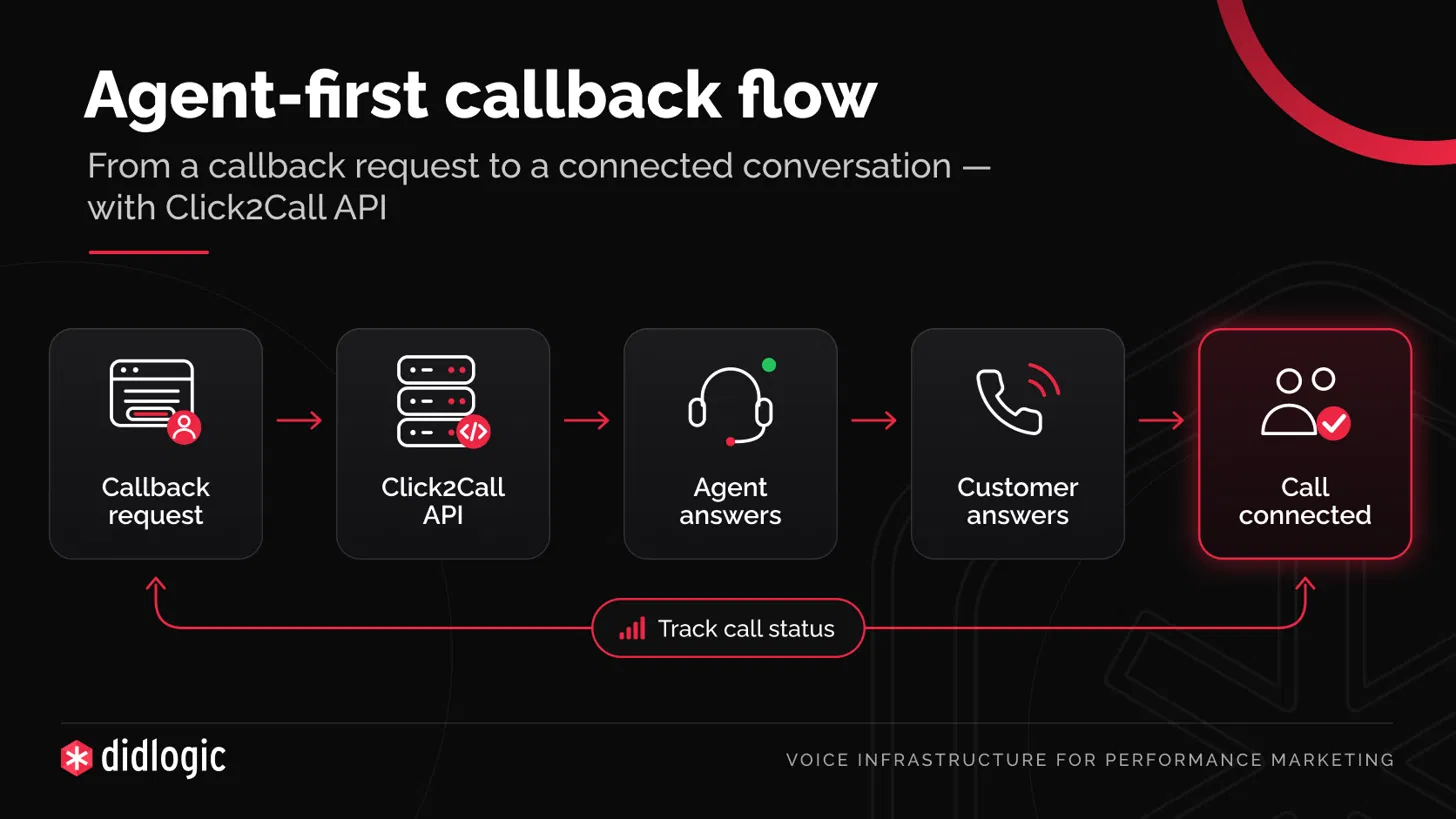
A typical agent-first workflow can look like this:
Step 1: The customer requests a callback
The website or CRM receives the phone number and the relevant lead information.
Step 2: The system initiates a call to an agent
Instead of dialing the customer immediately, the system first attempts to reach the designated agent or endpoint.
Step 3: The agent answers
Once the agent is connected, the system starts calling the customer.
This avoids initiating the customer leg before the agent is ready.
Step 4: The customer answers
If the customer answers successfully, both sides are connected.
Step 5: The system records the outcome
The campaign or CRM can use the resulting call status to distinguish successful connections from failed attempts.
At didlogic, our Click2Call API follows this agent-first model. It can initiate the two call legs, bridge them together, and provide status updates such as agent answered, customer ringing, bridged, completed, or failed. These statuses are useful because they show where a call progressed rather than simply reporting that a callback was requested.
Consider an example with 100 callback requests. The following numbers are hypothetical, but they illustrate how much information can be hidden behind a single conversion metric.
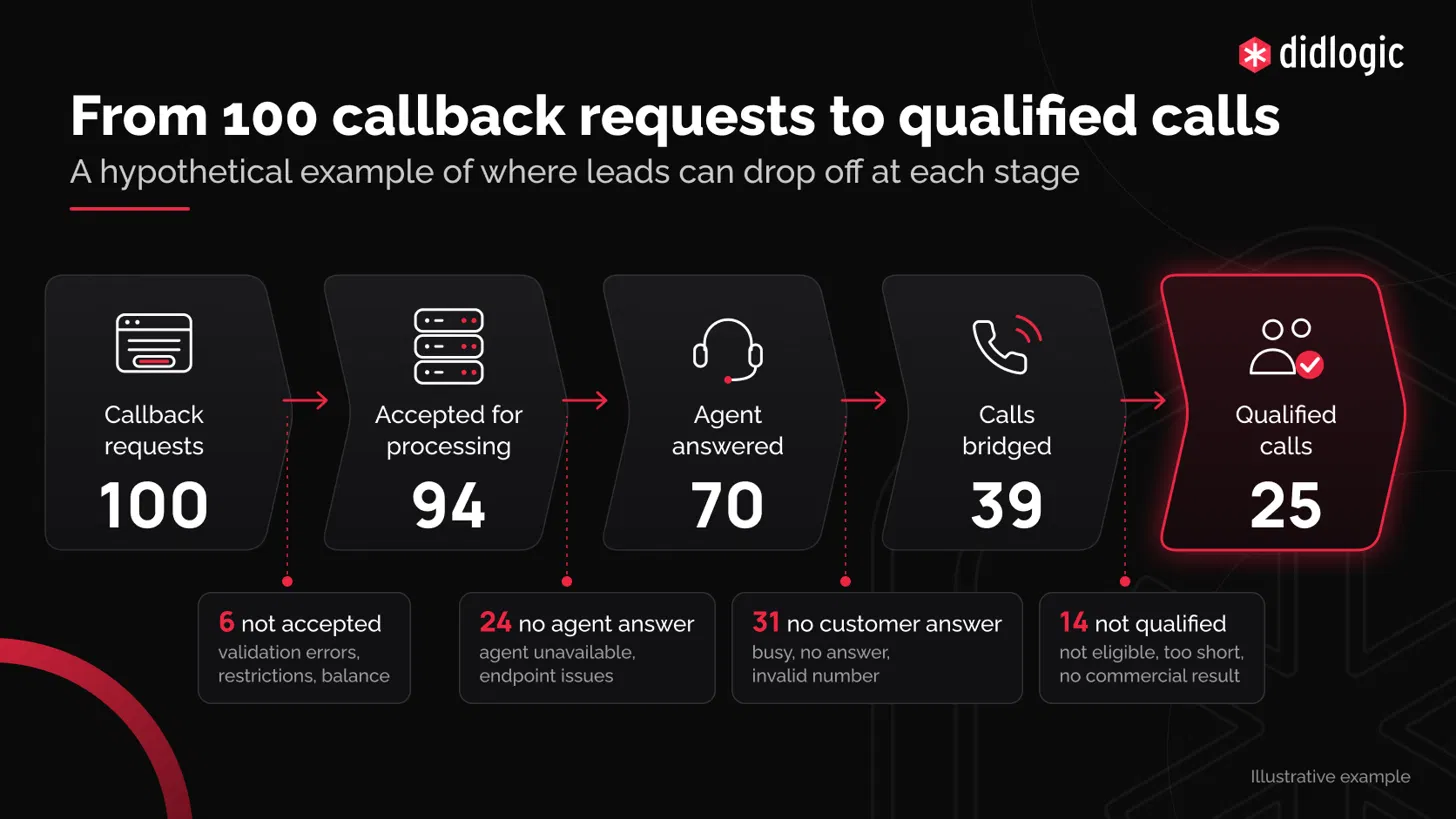
If you only look at the original 100 requests and the final 25 qualified calls, you might assume the traffic is poor. But the intermediate numbers tell a more useful story. Six requests weren't accepted for call processing. Another 24 accepted requests never reached the agent-answer stage. And even after an agent answered, only 39 calls were successfully connected. Those are different problems requiring different investigations.
For example:
If you're running callback-based campaigns, these metrics can provide a useful starting point.
1. Callback request acceptance rate
How many callback requests were accepted for processing?
Accepted requests ÷ total callback requests.
This helps identify problems before call setup even begins.
2. Agent answer rate
How many accepted requests reached an answered agent?
Agent-answered calls ÷ accepted requests.
A low percentage may indicate an agent availability or endpoint issue.
3. Bridged-call rate
How many accepted requests resulted in both parties being connected?
Bridged calls ÷ accepted requests.
This is an important operational metric because it measures actual connections rather than call attempts.
4. Time to connection
How much time passes between the callback request and the successful connection? Track the distribution, not just the average. A few very slow callbacks may be hidden by an otherwise healthy average.
5. Qualified-call rate
How many connected conversations actually meet the campaign's qualification criteria?
Qualified calls ÷ bridged calls.
Qualification requires data from the campaign, advertiser, or call tracking system. A telecom connection status alone cannot determine whether a call is eligible for payout.
Together, these metrics help distinguish technical problems from marketing and qualification problems.
If your campaign is generating leads but not enough successful calls, it may be worth reviewing the callback process before increasing your ad budget.
Here's a practical checklist.
Before the call:
One distinction is worth making. Call tracking platforms and telecom infrastructure solve related but different problems. A Pay Per Call tracking platform can help with attribution, campaign reporting, call distribution, and qualification workflows. A telecom provider handles the underlying calling and connectivity layer. For callback campaigns, these systems may need to work together.
For example, a lead generation team might use:
At didlogic, we provide the voice infrastructure behind business calling workflows. Our Click2Call API allows a system to initiate an agent-first call and connect the agent with the customer. It also provides call status information through an API, with optional webhooks for monitoring call events. This can help teams building callback forms, CRM-based calling workflows, or integrations between lead generation systems and call centers. It is not a replacement for your CRM, affiliate tracker, or call-center operations. It's the connectivity layer that can be integrated into those systems.
For anyone interested in the technical details, the API documentation is available here:
https://docs.didlogic.com/docs/api/click-2-call-create/
Generating a callback request and generating a successful phone conversation are two different things. A campaign can produce plenty of interested leads while losing opportunities during call initiation, agent connection, customer dialing, or qualification. Before assuming that you need more traffic, it helps to understand what happens after someone submits the form.
For those running Pay Per Call or callback-based leadgen campaigns:
Where do you see the biggest challenge right now: getting people to request a call, connecting them with an agent, or turning connected calls into qualified leads?
Curious to hear how others are handling this part of the funnel.
Getting someone to submit a lead form is one thing. Getting that person on the phone with the right agent is another. This matters for Pay Per Call, lead generation, home services, insurance, and any campaign where the actual conversion happens during a phone conversation. Imagine someone clicks your ad, lands on a page, fills out a form, and requests a callback. From the affiliate's perspective, the lead has been generated. But what happens next?
Does an agent become available? Does the system successfully dial the customer? Does the customer answer? Do both parties actually get connected? Every one of those steps can affect how many conversations your campaign generates. Let's look at how callback funnels work and what can go wrong between a submitted form and a connected call.
1. Not every phone lead follows the same path
There are three common ways to turn website visitors into phone conversations.
Direct inbound calls
The visitor sees a phone number on the landing page and calls it directly. This is common in traditional Pay Per Call campaigns. The tracking and routing setup determines where the call goes and how it is attributed.
Click-to-call buttons
The visitor taps a phone button on the website, which opens the phone's dialer. It's convenient on mobile because the visitor doesn't need to copy a number. However, the visitor still has to initiate the call.
Callback requests
The visitor submits their phone number and requests to be contacted. Instead of waiting for the customer to dial, the business initiates the calling process. A simplified callback flow looks like this:
Visitor submits form → Callback request → Agent answers → Customer is called → Both parties are connected
The important difference is that the customer doesn't need to make the initial phone call. This can be useful for funnels where visitors want to speak with someone but may not be ready or able to call immediately. However, a callback request is not automatically a successful call.
2. Where callback funnels lose potential conversations
There are several points where an apparently successful lead can turn into a missed opportunity.
The callback starts too late
Someone requests a call while actively looking for a service. If the business contacts them much later, they may have moved on, contacted a competitor, or simply become unavailable. This doesn't mean every callback has to happen instantly. Some users request a specific time, and calling outside the agreed window can create more problems. The important thing is matching the calling process to the customer's expectations.
Questions worth checking:
- How much time passes between the form submission and the first call attempt?
- Are callbacks initiated during the customer's local business hours?
- What happens when a request arrives outside working hours?
No agent is available
A callback workflow needs someone or something to handle the conversation. If the system attempts to connect an unavailable agent, the customer may never receive the call. This becomes especially important when traffic volume increases. A call center that handles a small campaign comfortably may struggle when several campaigns send leads simultaneously.
The customer doesn't answer
Even when an agent is ready, the customer may not pick up.
There can be several explanations:
- The customer doesn't recognize the caller ID.
- The request was made some time ago.
- The call arrives at an inconvenient moment.
- The customer has already contacted another provider.
- The number is incorrect or unreachable.
The call fails before the connection
There is also the technical side. A call request can be accepted by a system without resulting in a connected conversation. For example, the agent endpoint might be unreachable, the destination number might be invalid, or the call might fail during setup. Without call-level status information, these situations can all look like the same outcome: no conversation.
The call connects but doesn't qualify
Finally, a connected call is not necessarily a qualified lead or a payable conversion. A conversation may be too short, reach the wrong person, fail qualification requirements, or produce no commercial result. For Pay Per Call campaigns, the network or advertiser may also have specific rules about eligible calls and attribution. That is why it helps to distinguish between a connected call and a qualified call.
3. What a callback system should actually do
Let's use a simple example. A visitor lands on a home services page, completes a short form, and requests a callback. The business has a call center with agents ready to handle these requests.
A typical agent-first workflow can look like this:
Step 1: The customer requests a callback
The website or CRM receives the phone number and the relevant lead information.
Step 2: The system initiates a call to an agent
Instead of dialing the customer immediately, the system first attempts to reach the designated agent or endpoint.
Step 3: The agent answers
Once the agent is connected, the system starts calling the customer.
This avoids initiating the customer leg before the agent is ready.
Step 4: The customer answers
If the customer answers successfully, both sides are connected.
Step 5: The system records the outcome
The campaign or CRM can use the resulting call status to distinguish successful connections from failed attempts.
At didlogic, our Click2Call API follows this agent-first model. It can initiate the two call legs, bridge them together, and provide status updates such as agent answered, customer ringing, bridged, completed, or failed. These statuses are useful because they show where a call progressed rather than simply reporting that a callback was requested.
4. Why call statuses matter more than a single conversion number
Consider an example with 100 callback requests. The following numbers are hypothetical, but they illustrate how much information can be hidden behind a single conversion metric.
If you only look at the original 100 requests and the final 25 qualified calls, you might assume the traffic is poor. But the intermediate numbers tell a more useful story. Six requests weren't accepted for call processing. Another 24 accepted requests never reached the agent-answer stage. And even after an agent answered, only 39 calls were successfully connected. Those are different problems requiring different investigations.
For example:
- Low request acceptance: Check API configuration, validation errors, account restrictions, and available balance.
- Low agent answer rate: Check agent availability, SIP endpoints, and call-center capacity.
- Low bridged-call rate: Investigate customer answer behavior, destination availability, and call failure reasons.
- Low qualification rate despite successful connections: Review lead expectations, qualification criteria, and conversation quality.
5. Five metrics worth tracking
If you're running callback-based campaigns, these metrics can provide a useful starting point.
1. Callback request acceptance rate
How many callback requests were accepted for processing?
Accepted requests ÷ total callback requests.
This helps identify problems before call setup even begins.
2. Agent answer rate
How many accepted requests reached an answered agent?
Agent-answered calls ÷ accepted requests.
A low percentage may indicate an agent availability or endpoint issue.
3. Bridged-call rate
How many accepted requests resulted in both parties being connected?
Bridged calls ÷ accepted requests.
This is an important operational metric because it measures actual connections rather than call attempts.
4. Time to connection
How much time passes between the callback request and the successful connection? Track the distribution, not just the average. A few very slow callbacks may be hidden by an otherwise healthy average.
5. Qualified-call rate
How many connected conversations actually meet the campaign's qualification criteria?
Qualified calls ÷ bridged calls.
Qualification requires data from the campaign, advertiser, or call tracking system. A telecom connection status alone cannot determine whether a call is eligible for payout.
Together, these metrics help distinguish technical problems from marketing and qualification problems.
6. How to improve a callback funnel before buying more traffic
If your campaign is generating leads but not enough successful calls, it may be worth reviewing the callback process before increasing your ad budget.
Here's a practical checklist.
Before the call:
- Make sure the form clearly explains that the customer is requesting a phone call.
- Capture the customer's phone number in a consistent international format.
- Check that consent, calling hours, and local requirements are respected.
- Confirm that agents are available when callbacks are initiated.
- Distinguish an accepted request from an answered or connected call.
- Track whether the agent leg was answered.
- Monitor whether the customer leg was successfully connected.
- Record meaningful failure reasons instead of grouping everything under "failed."
- Keep unsuccessful calls separate from completed conversations.
- Review whether missed calls should be retried, and under what conditions.
- Make sure retries don't create duplicate or unwanted contacts.
- Compare connected calls against the advertiser's qualification results.
7. Callback infrastructure and Pay Per Call tracking are not the same thing
One distinction is worth making. Call tracking platforms and telecom infrastructure solve related but different problems. A Pay Per Call tracking platform can help with attribution, campaign reporting, call distribution, and qualification workflows. A telecom provider handles the underlying calling and connectivity layer. For callback campaigns, these systems may need to work together.
For example, a lead generation team might use:
- A landing page or quiz funnel to collect requests.
- A CRM or automation system to manage leads.
- A Click2Call API to initiate and connect calls.
- A tracking platform to attribute and evaluate conversions.
8. Where didlogic fits into this setup
At didlogic, we provide the voice infrastructure behind business calling workflows. Our Click2Call API allows a system to initiate an agent-first call and connect the agent with the customer. It also provides call status information through an API, with optional webhooks for monitoring call events. This can help teams building callback forms, CRM-based calling workflows, or integrations between lead generation systems and call centers. It is not a replacement for your CRM, affiliate tracker, or call-center operations. It's the connectivity layer that can be integrated into those systems.
For anyone interested in the technical details, the API documentation is available here:
https://docs.didlogic.com/docs/api/click-2-call-create/
Final takeaway
Generating a callback request and generating a successful phone conversation are two different things. A campaign can produce plenty of interested leads while losing opportunities during call initiation, agent connection, customer dialing, or qualification. Before assuming that you need more traffic, it helps to understand what happens after someone submits the form.
For those running Pay Per Call or callback-based leadgen campaigns:
Where do you see the biggest challenge right now: getting people to request a call, connecting them with an agent, or turning connected calls into qualified leads?
Curious to hear how others are handling this part of the funnel.