



You launched the campaign, Clicks are coming in. The dashboard affiliate network says 0 conversions - 0€. Before you kill the campaign or throw more money at it diagnose the funnel in a fixed order.

IMPRESSION → AD CLICK → LANDING PAGE → OFFER CLICK → CONVERSION → APPROVED REVENUE
Some campaigns will have additional steps such as a quiz, registration, checkout, deposit, purchase or manual lead approval. That is fine.
CLICK
↓
Tracker creates: clickid = ABC123
↓
Offer URL receives: aff_sub = ABC123
↓
User converts
↓
Network sends postback containing the click ID
↓
Tracker matches ABC123
↓
Conversion appears in the tracker
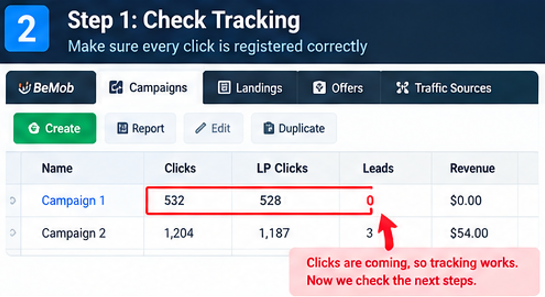
Run a controlled test click through the same tracking path used by the campaign. Then inspect the logs on both sides. You want to know whether the identifier survives the complete handoff.
Read the ad message, then immediately read the landing-page headline. Ask yourself one question: “Would the visitor believe they arrived at the place they expected?”
Do what I described below:
AD PROMISE
↓
LANDING PAGE MESSAGE
↓
REASON TO CONTINUE
↓
CTA
↓
OFFER
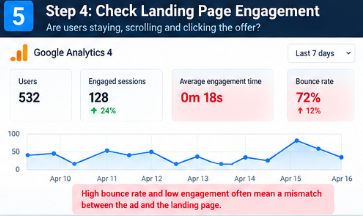
A high CTR followed by weak engagement can be a message-match problem. Strong engagement followed by very few offer clicks can indicate weak positioning, unclear value, excessive friction or a poor CTA.
Also test the entire path manually. Click the CTA. Follow the redirect. Check the offer page on mobile. Make sure there is no broken link, unexpected redirect, slow-loading resource or extra step that was not present during your own test.
Important: Do not “fix” everything at once. Choose the hypothesis most strongly supported by the data and isolate that change.
Break-even conversion rate = traffic cost per click ÷ revenue per conversion
Revenue per 1,000 clicks = conversion rate × payout × 1,000
Example: your traffic costs $0.35 per click and the approved payout is $25. The break-even conversion rate is:
$0.35 ÷ $25 = 1.4%
That means the campaign needs roughly 1.4% approved conversion rate just to cover the traffic cost, before considering other costs or revenue adjustments.
When enough data is available, stop looking at the campaign as one number. Break it down by the dimensions that can materially change user behaviour.
The useful question is: “Where is the zero concentrated?”
ALL TRAFFIC → 0 conversions
GEO A → 0
GEO B → 4
MOBILE → 4
DESKTOP → 0
Conclusion: investigate the desktop path before rebuilding the whole campaign.
If everything is zero, investigate the common layer first: tracking, offer, funnel or fundamental traffic mismatch. If one segment behaves differently, the problem may be much more specific.
1. Start with the funnel
Before changing anything, write down exactly what should happen after the user clicks your ad. The objective is to find the first point where reality stops matching the intended flow.IMPRESSION → AD CLICK → LANDING PAGE → OFFER CLICK → CONVERSION → APPROVED REVENUE
Some campaigns will have additional steps such as a quiz, registration, checkout, deposit, purchase or manual lead approval. That is fine.
| Time | Investigation |
|---|---|
| 0–5 min | Tracking and attribution |
| 5–10 min | Traffic quality and targeting |
| 10–15 min | Landing page and message match |
| 15–20 min | Offer and conversion mechanics |
| 20–25 min | Segment analysis |
| 25–30 min | Decision and next test |
2. Spend 5 min proving that tracking works
Broken attribution chain can make a converting campaign look completely dead. For many affiliate setups, the tracker generates a unique click ID, that ID is passed to your affiliate network, and the network later sends the same identifier back through a postback when a conversion happens.CLICK
↓
Tracker creates: clickid = ABC123
↓
Offer URL receives: aff_sub = ABC123
↓
User converts
↓
Network sends postback containing the click ID
↓
Tracker matches ABC123
↓
Conversion appears in the tracker
Run a controlled test click through the same tracking path used by the campaign. Then inspect the logs on both sides. You want to know whether the identifier survives the complete handoff.
| What you see | Likely area to investigate |
|---|---|
| Ad platform has clicks, tracker has zero | Wrong destination URL, broken routing, blocked tracking, or campaign setup problem. |
| Tracker has clicks, affiliate network has no corresponding clicks | Offer-link handoff or click-ID parameter may be incorrect. |
| Affiliate network has clicks, tracker has zero conversions | Postback, attribution or conversion-event configuration. |
| Network has conversions, tracker has zero | Tracker attribution or postback mapping needs checking. |
| Tracker receives conversions but revenue is wrong | Payout, currency, token or conversion-value mapping may be incorrect. |
3. Audit the traffic before blaming the offer
Look at the quality of the visitor, not only the quantity of visitors.
Check the source, publisher or placement, GEO, language, device, operating system, browser, campaign type, audience and time pattern. A cheap click can still be expensive if it carries very little commercial intent.| Signal: | Possible interpretation: |
|---|---|
| High CTR + very short sessions | The creative may be generating curiosity rather than meaningful intent, or the landing page may not match the ad promise. |
| Good engagement + very low offer-click rate | The problem may be between the landing page and the commercial proposition. |
| One placement generates most clicks and no downstream activity | Investigate that placement separately instead of judging the whole source. |
| One GEO or device behaves completely differently | Segment first. A global average can hide the actual bottleneck. |
4. Inspect the landing page like a Visitor
Do not review your landing page like its creator. Open it on the device used by your traffic and pretend you have never seen it before.Read the ad message, then immediately read the landing-page headline. Ask yourself one question: “Would the visitor believe they arrived at the place they expected?”
Do what I described below:
AD PROMISE
↓
LANDING PAGE MESSAGE
↓
REASON TO CONTINUE
↓
CTA
↓
OFFER
A high CTR followed by weak engagement can be a message-match problem. Strong engagement followed by very few offer clicks can indicate weak positioning, unclear value, excessive friction or a poor CTA.
Also test the entire path manually. Click the CTA. Follow the redirect. Check the offer page on mobile. Make sure there is no broken link, unexpected redirect, slow-loading resource or extra step that was not present during your own test.
Important: Do not “fix” everything at once. Choose the hypothesis most strongly supported by the data and isolate that change.
5. Interrogate the offer and the economics
At this point the question changes from “Does this offer look good?” to “Can this specific traffic complete this specific conversion event at a viable cost?”Break-even conversion rate = traffic cost per click ÷ revenue per conversion
Revenue per 1,000 clicks = conversion rate × payout × 1,000
Example: your traffic costs $0.35 per click and the approved payout is $25. The break-even conversion rate is:
$0.35 ÷ $25 = 1.4%
That means the campaign needs roughly 1.4% approved conversion rate just to cover the traffic cost, before considering other costs or revenue adjustments.
| Question | Why it matters |
|---|---|
| What exactly counts as a conversion? | A click, registration, lead, deposit and purchase are different events with different economics. |
| Is there an approval delay? | A conversion may not appear immediately. A very recent zero can be misleading. |
| Does the traffic type match the offer rules? | Traffic restrictions can affect both compliance and campaign viability. |
| Does the funnel work on the target device? | A working desktop funnel can still fail on mobile. |
6. Segment the Zero
When enough data is available, stop looking at the campaign as one number. Break it down by the dimensions that can materially change user behaviour.
| Segment | What to compare |
|---|---|
| GEO | Country, language and market. |
| Device | Mobile, desktop, tablet, operating system. |
| Placement | Publisher, website, app, sub-source or placement ID. |
| Creative | Hook, angle, visual, CTA and message. |
ALL TRAFFIC → 0 conversions
GEO A → 0
GEO B → 4
MOBILE → 4
DESKTOP → 0
Conclusion: investigate the desktop path before rebuilding the whole campaign.
If everything is zero, investigate the common layer first: tracking, offer, funnel or fundamental traffic mismatch. If one segment behaves differently, the problem may be much more specific.
7. Make one of three decisions
| Decision | When it makes sense | Next action |
|---|---|---|
| KEEP TESTING | The technical path is sound and the current evidence is not strong enough to reject the hypothesis. | Collect a cleaner sample without changing the core setup. |
| CHANGE ONE VARIABLE | A specific bottleneck is supported by the data. | Change one element: creative angle, landing-page message, placement, traffic segment or offer. |
| KILL / REPLACE | Tracking works, the traffic has been sufficiently tested, and the economics or offer match are clearly non-viable. | Document the reason and carry the learning into the next campaign. |