



Today, we’re looking at another example of how controlled scaling, the right tools, and a clear strategy can deliver a strong result.
This time, the campaign started with a modest ad budget. Still relatively new to the ProPush.me Constructor, the publisher sent Facebook traffic to landing pages built with Constructor and generated $1,581 while maintaining a strong ROI. A solid start, with plenty of room to grow.
Keep reading to see the publisher’s strategy, the creatives that worked, the optimization steps he followed, and practical tips for getting the most out of Constructor.
But first, here’s a quick overview of the campaign.
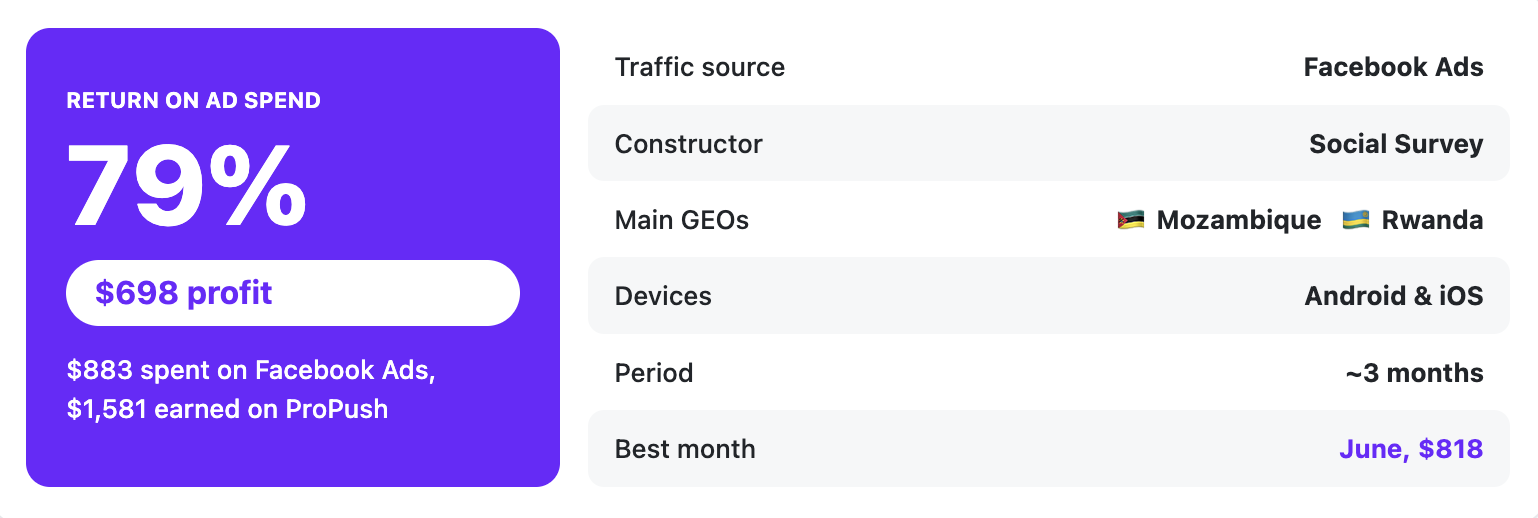
Here is how he described it himself:
"Over the past three months, I have been testing and optimizing Facebook traffic with ProPush.me's Constructor to find combinations of traffic sources, GEOs, creatives, and campaign settings that could consistently generate revenue."
"I focused on using Facebook because it provides the ability to test different audiences and creatives quickly and scale campaigns when I find a combination that performs well."
The Facebook audience mindset was another factor. It matched the Constructor’s Social Survey template he selected.
Facebook traffic is driven by curiosity: users scroll, something catches their attention, they tap to find out more, and the Social Survey flow then asks a few light social questions that a curious visitor can answer without much hesitation.
The offer page also helped shape the creative approach:
"Social Survey Constructor tends to make sure users interact with social-related questions, and since the offer page contains questions about the user's age, gender, and relationship status, this gave me an idea of the style of creatives that will likely perform."
We’ll return to the creatives shortly. First, let’s look at the campaign targeting.
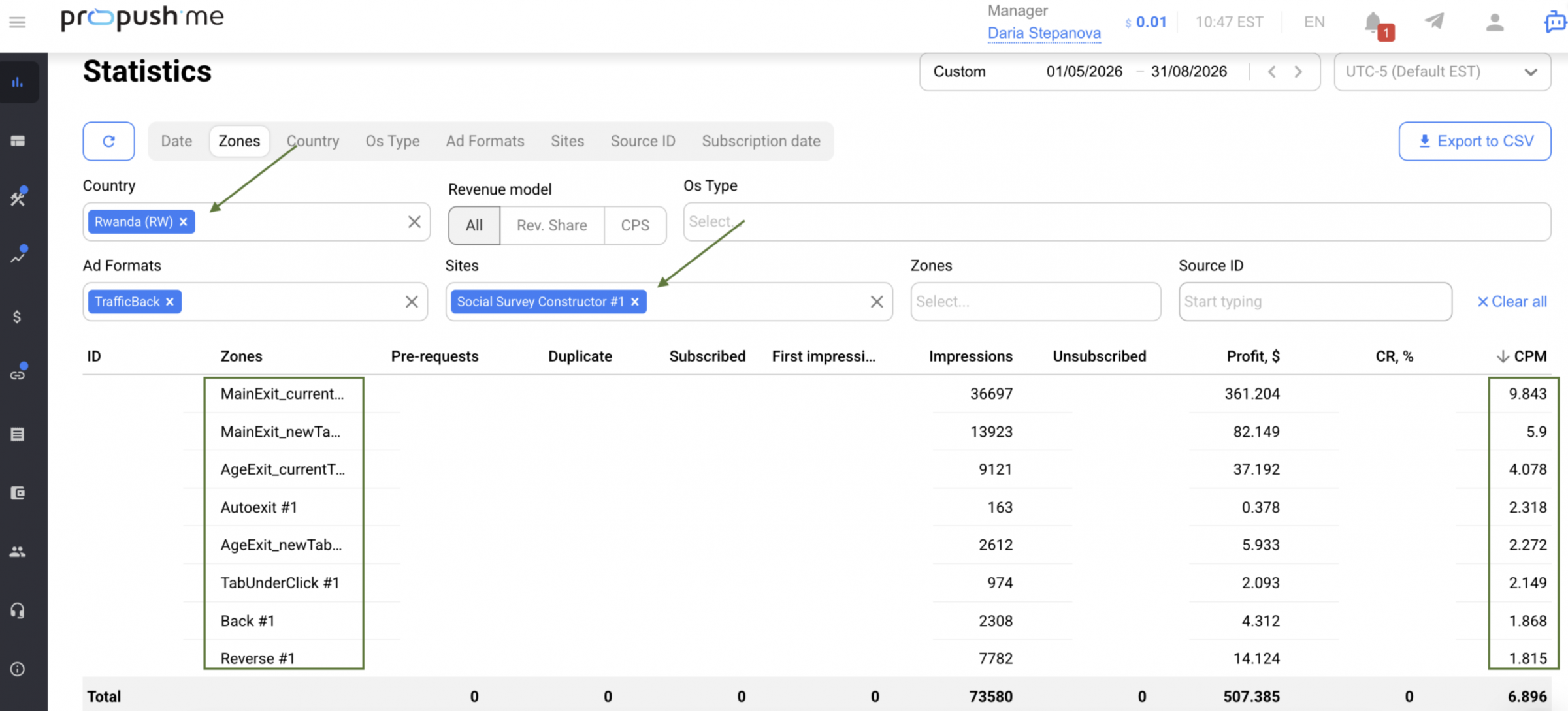
That doesn’t mean other GEOs weren’t tested, but these two consistently generated the largest share of traffic and revenue, so that’s where the budget was allocated.
The campaigns targeted Android and iOS users together, with an average CPM of around $6 throughout the period.
That $6 CPM became the publisher’s key benchmark. With RevShare, the logic is straightforward: the flow needs to generate more revenue than the traffic costs. This helped determine the maximum amount he could afford to pay for each result before launching a campaign.
"I usually use non-explicit female-focused ad concepts, taking inspiration from the type of content and topics that people already interact with on social media platforms such as Facebook and Pinterest. The main idea is to make the creative captivating and create enough curiosity for the user to click and engage. This is important because the quality of the traffic also affects the cost per result."
Here are the main rules he recommends:
In his best-performing campaigns, the cost per landing page view dropped to around ₦5 (about $0.003), although the figure varied significantly depending on the GEO, audience, campaign, and creative.
"Starting with a small budget allows me to limit the initial risk while Meta gathers data and optimizes the ad set during the learning phase, which normally takes around 2–3 days. Since the average eCPM on the affiliate network is around $6, I need to maintain a low CPR in order to stay profitable. Spending too much on a newly created ad set can increase the traffic cost before I know whether the combination will work."
This relatively small budget allowed him to get through the unpredictable first days without overspending while still collecting enough data to assess the combination.
As he put it, "the objective at this stage was not immediately to maximize revenue."
Instead, the initial budget was used to answer several basic questions:
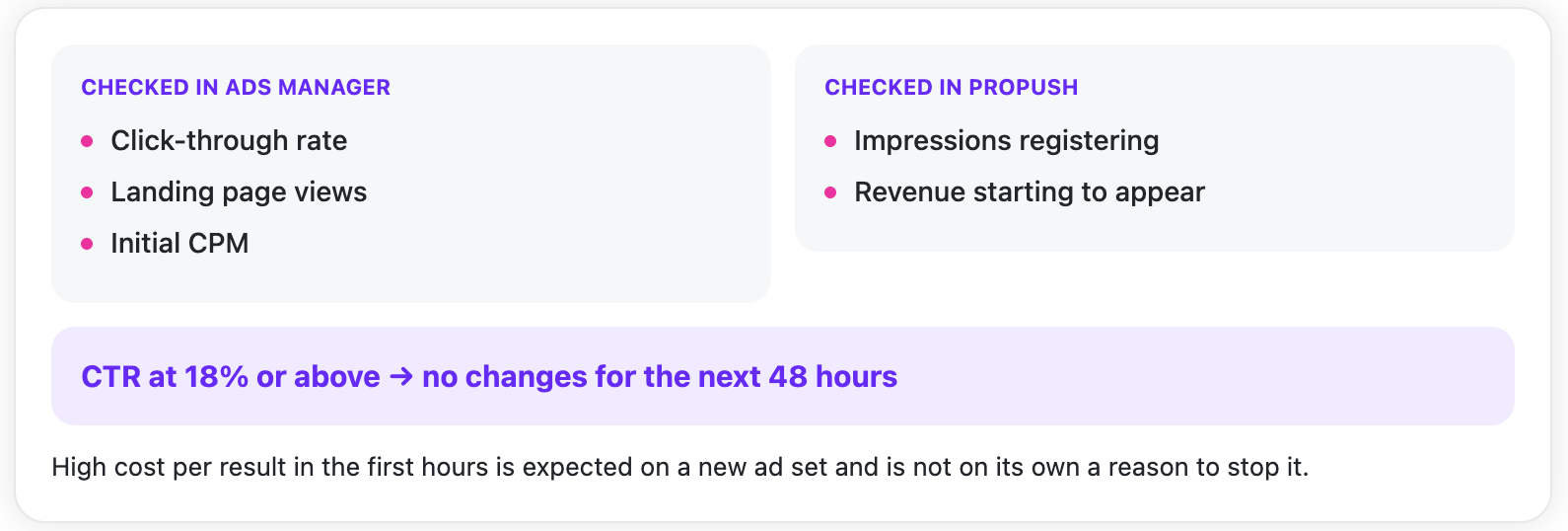
Two points stand out:
Leaving strong-performing creatives untouched can be difficult. Editing a live ad set can push it back into the learning phase, so changing a promising setup too early may interfere with its stabilization.
There’s another important number in the publisher’s testing process:
"Typically, I test around 3–5 ad sets before identifying a combination that I consider profitable enough to scale."
In other words, the testing budget should account for multiple launches rather than a single campaign.
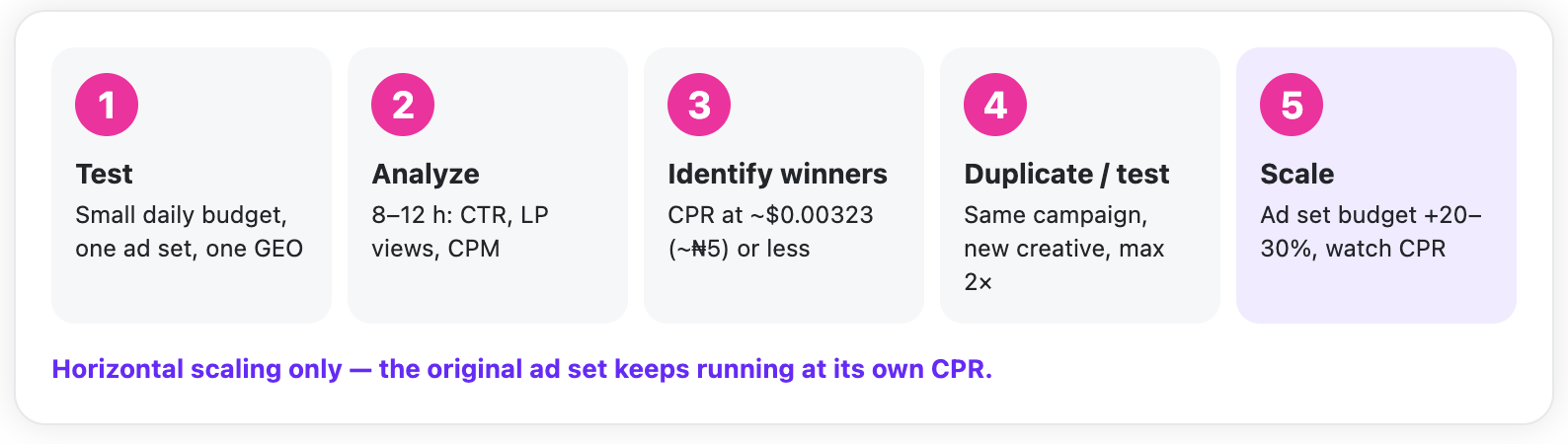
The next decision is how to scale. The publisher can either scale horizontally by duplicating a working ad set or vertically by increasing its budget with a bid cap:
"Both methods work, but duplicating an already performing ad set within the same campaign can be easier without interrupting the initial CPR or performance, and this works better in my own case. I usually test new creatives when duplicating an ad set within the same campaign. Also, I always duplicate a winning ad set not more than two times to avoid audience fragmentation."
The approach is deliberately limited to two duplicates. Going further can lead to audience fragmentation and competition between ad sets.
His process can be summarized as one continuous loop:
"Facebook can also be challenging because advertisements may sometimes be rejected or become unavailable. When this happened, I worked on creating or modifying alternative creatives so that I could continue testing and maintaining traffic flow while staying within the platform's advertising requirements."
He’s referring to Meta’s Advertising Standards, which are worth checking before building a creative rather than after it gets rejected.
Optimization also wasn’t tied to a fixed schedule. As the publisher explained, "when I found an ad set performing better than the others, I used it as a basis for further testing." Stronger ad sets became the basis for the next tests, while weaker creatives were removed before consuming more of the budget. Then the cycle started again.
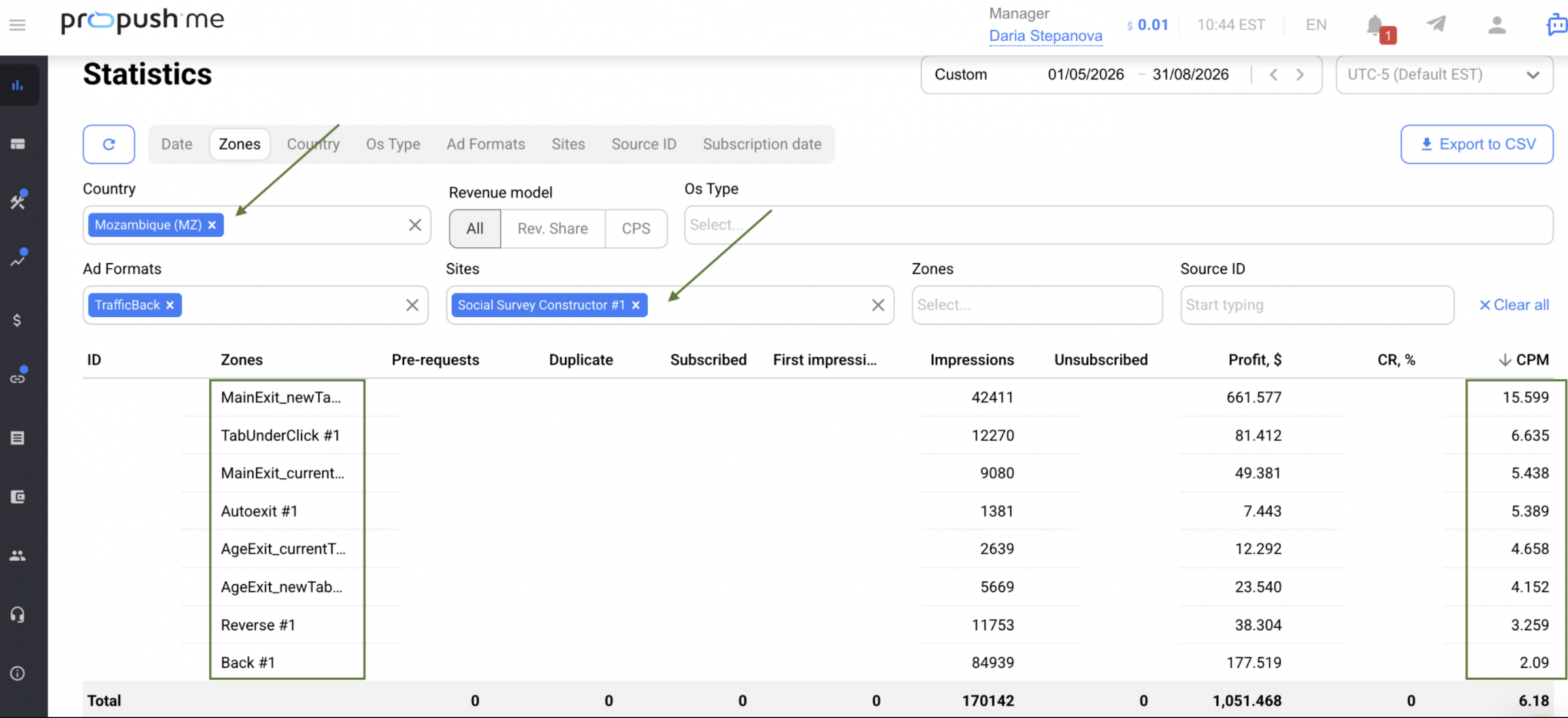
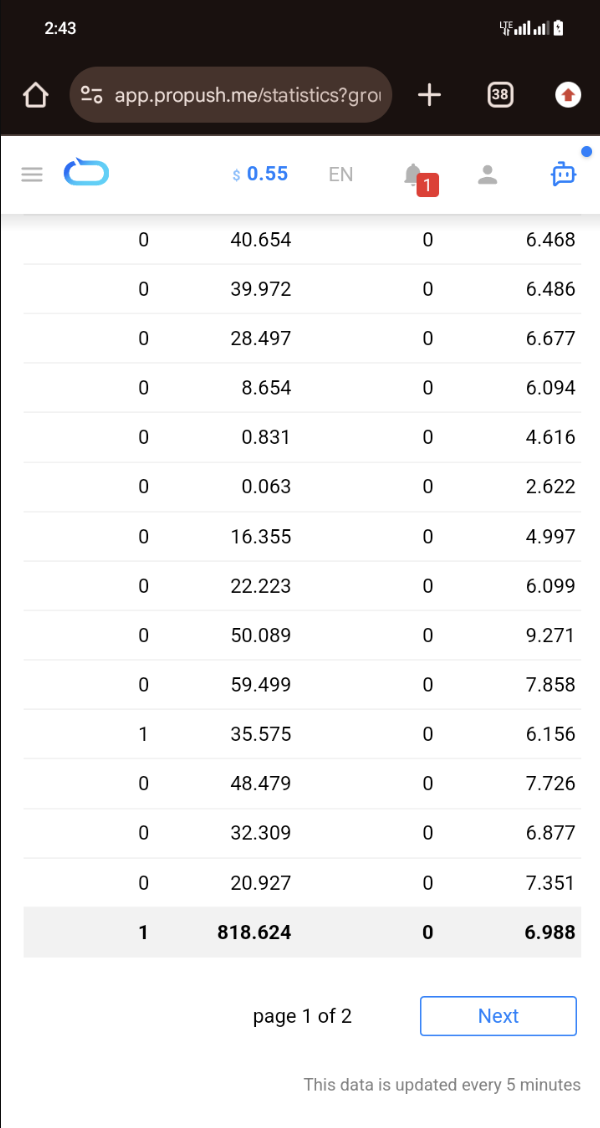
June was the standout month, generating $818.62 at a $6.988 CPM. Since the CPM was also above the campaign average, the June result was not simply a matter of traffic volume — the traffic itself was generating more revenue.
The economics of the run:
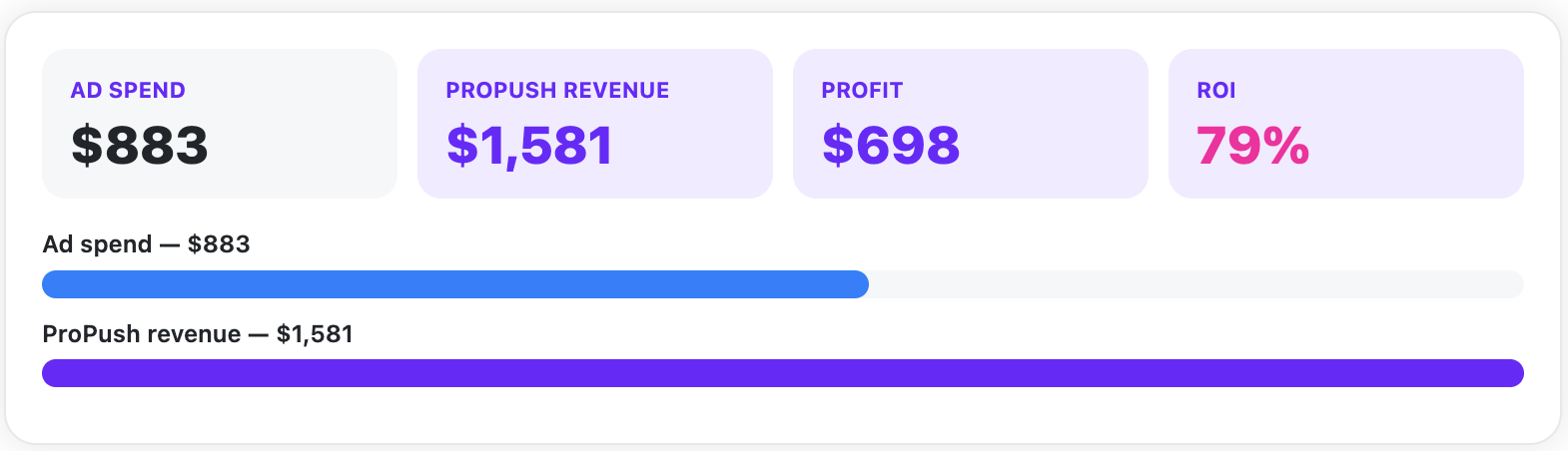
For campaigns that started at just $3 a day, $1,581 over three months is a solid result. More than half of the revenue came in June, when the setup was already performing at its best.
Apart from GEO, remember that Constructor monetizes traffic across several zones, each corresponding to a different stage of user engagement. Main Exit represents the highest level of engagement, so its CPM will often be higher. Other monetization zones may show lower CPMs, which is completely normal.
That’s why it’s worth checking the Constructor exit breakdown rather than looking only at overall funnel performance. The distribution across exits gives a clearer view of how the funnel worked: where users dropped off, which paths generated the most value, and whether one particular exit significantly outperformed the others.
Customize before you write a template off. Constructor templates are editable, and sometimes a few wording changes can turn a weak landing page around. It’s a quick and inexpensive way to check whether the flow is wrong for your traffic or simply uses the wrong messaging.
ProPush.me AI Assistant makes adjusting landing page copy and design faster. You can use a simple chat to update copy, images, colors, CTAs, and other page elements, adapt the landing to a specific GEO, and create multiple versions for testing — without editing the code.
Want to try a similar setup?
Open Constructor in your ProPush.me account, choose a flow that fits your traffic, customize it, and start with a small test. If you’d like to see what the same tool can do with a much bigger budget, check out our earlier Constructor case study.
TRY PROPUSH.ME CONSTRUCTOR NOW
This time, the campaign started with a modest ad budget. Still relatively new to the ProPush.me Constructor, the publisher sent Facebook traffic to landing pages built with Constructor and generated $1,581 while maintaining a strong ROI. A solid start, with plenty of room to grow.
Keep reading to see the publisher’s strategy, the creatives that worked, the optimization steps he followed, and practical tips for getting the most out of Constructor.
But first, here’s a quick overview of the campaign.
Here is how he described it himself:
"Over the past three months, I have been testing and optimizing Facebook traffic with ProPush.me's Constructor to find combinations of traffic sources, GEOs, creatives, and campaign settings that could consistently generate revenue."
Why Did He Opt for Facebook Traffic?
According to the publisher, the main advantage was the speed of the feedback loop:"I focused on using Facebook because it provides the ability to test different audiences and creatives quickly and scale campaigns when I find a combination that performs well."
The Facebook audience mindset was another factor. It matched the Constructor’s Social Survey template he selected.
Facebook traffic is driven by curiosity: users scroll, something catches their attention, they tap to find out more, and the Social Survey flow then asks a few light social questions that a curious visitor can answer without much hesitation.
The offer page also helped shape the creative approach:
"Social Survey Constructor tends to make sure users interact with social-related questions, and since the offer page contains questions about the user's age, gender, and relationship status, this gave me an idea of the style of creatives that will likely perform."
We’ll return to the creatives shortly. First, let’s look at the campaign targeting.
Targeting & Benchmarks
The main GEOs were Mozambique and Rwanda.That doesn’t mean other GEOs weren’t tested, but these two consistently generated the largest share of traffic and revenue, so that’s where the budget was allocated.
The campaigns targeted Android and iOS users together, with an average CPM of around $6 throughout the period.
That $6 CPM became the publisher’s key benchmark. With RevShare, the logic is straightforward: the flow needs to generate more revenue than the traffic costs. This helped determine the maximum amount he could afford to pay for each result before launching a campaign.
The Creatives That Got the Clicks
With the GEOs covered, let’s move on to the creative strategy:"I usually use non-explicit female-focused ad concepts, taking inspiration from the type of content and topics that people already interact with on social media platforms such as Facebook and Pinterest. The main idea is to make the creative captivating and create enough curiosity for the user to click and engage. This is important because the quality of the traffic also affects the cost per result."
Here are the main rules he recommends:
- (Very important!) Target men aged 25–45. "From my testing, male audiences between 25–45 years old tended to perform better."
- Stick to one idea per creative. Use simple images built to generate the click rather than layered compositions that take time to understand.
- Spark curiosity instead of explaining everything. The creative should make users wonder what is happening or what they will discover after clicking. Nothing more is required.
- Don’t overlook the primary text and headline. In his words: "Primary texts and headlines are also necessary because users read what the ad is talking about most of the time before making the decision to click."
In his best-performing campaigns, the cost per landing page view dropped to around ₦5 (about $0.003), although the figure varied significantly depending on the GEO, audience, campaign, and creative.
Setup, Optimization, and Scaling
The publisher shared a detailed breakdown covering the entire process, from the initial campaign setup through optimization and scaling. Here’s how he turned early test results into consistently profitable campaigns.Starting at $3 a Day Per Campaign
When launching a new campaign, the publisher avoided going all-in from the start. Instead, he used a small budget to test the setup:"Starting with a small budget allows me to limit the initial risk while Meta gathers data and optimizes the ad set during the learning phase, which normally takes around 2–3 days. Since the average eCPM on the affiliate network is around $6, I need to maintain a low CPR in order to stay profitable. Spending too much on a newly created ad set can increase the traffic cost before I know whether the combination will work."
This relatively small budget allowed him to get through the unpredictable first days without overspending while still collecting enough data to assess the combination.
As he put it, "the objective at this stage was not immediately to maximize revenue."
Instead, the initial budget was used to answer several basic questions:
- Is the GEO responding to the traffic?
- Is the creative generating enough curiosity?
- Is the landing page receiving affordable traffic?
- Is the Constructor generating conversions/revenue?
- Which ad sets and audiences show the strongest potential?
The First 8 to 12 hours
"After creating my campaigns, I usually leave it for about 8 to 12 hours, which is half of the day, in order to fast-track the performance. During this period, I usually use Ads Manager to check the click-through rate, the landing page views generated, the impressions accumulated on my affiliate network and also the initial CPM. The early check is to decide if the creatives used will perform well in the long run and also bring profit, since the earning mode is revshare. And since the early campaign always has a high CPR, no further changes are made with ads that have a good click-through rate between 18% or above for the next 48 hours."Two points stand out:
- First, CPR is usually high for a fresh ad set, so the publisher focuses on CTR at this stage.
- Second, an ad reaching 18% CTR or higher is given another 48 hours to run without changes.
One Ad Set at a Time
"I normally start each campaign with a single ad set and monitor it for around 8–12 hours, or sometimes 24 hours depending on the amount of data coming in. If an ad set is clearly underperforming, I stop it. The ones that perform well are allowed to run for another 2–3 days without making unnecessary changes. This gives the ad set time to go through the learning phase and stabilize before I consider scaling it."Leaving strong-performing creatives untouched can be difficult. Editing a live ad set can push it back into the learning phase, so changing a promising setup too early may interfere with its stabilization.
There’s another important number in the publisher’s testing process:
"Typically, I test around 3–5 ad sets before identifying a combination that I consider profitable enough to scale."
In other words, the testing budget should account for multiple launches rather than a single campaign.
When to Scale, and How
"I normally allow an ad set to reach around $15–$20 in ad spend before making a scaling decision. This gives me enough information to see whether the CPR is stable and whether the ad set can continue performing profitably."The next decision is how to scale. The publisher can either scale horizontally by duplicating a working ad set or vertically by increasing its budget with a bid cap:
"Both methods work, but duplicating an already performing ad set within the same campaign can be easier without interrupting the initial CPR or performance, and this works better in my own case. I usually test new creatives when duplicating an ad set within the same campaign. Also, I always duplicate a winning ad set not more than two times to avoid audience fragmentation."
The approach is deliberately limited to two duplicates. Going further can lead to audience fragmentation and competition between ad sets.
His process can be summarized as one continuous loop:
Keeping Creatives Alive on Facebook
A working creative can become unavailable for reasons unrelated to its performance. The publisher’s solution was to keep alternative creatives ready:"Facebook can also be challenging because advertisements may sometimes be rejected or become unavailable. When this happened, I worked on creating or modifying alternative creatives so that I could continue testing and maintaining traffic flow while staying within the platform's advertising requirements."
He’s referring to Meta’s Advertising Standards, which are worth checking before building a creative rather than after it gets rejected.
Optimization also wasn’t tied to a fixed schedule. As the publisher explained, "when I found an ad set performing better than the others, I used it as a basis for further testing." Stronger ad sets became the basis for the next tests, while weaker creatives were removed before consuming more of the budget. Then the cycle started again.
The Results
Over roughly 3 months, the campaigns generated $1,581.81 in ProPush.me earnings at an average CPM of $6.087.June was the standout month, generating $818.62 at a $6.988 CPM. Since the CPM was also above the campaign average, the June result was not simply a matter of traffic volume — the traffic itself was generating more revenue.
The economics of the run:
For campaigns that started at just $3 a day, $1,581 over three months is a solid result. More than half of the revenue came in June, when the setup was already performing at its best.
Quick Tips From the ProPush.me Team
Check CPM by GEO and monetization zone, not just overall. June’s CPM was $6.988 versus the $6.087 average. A difference like that can affect whether your CPR target still makes sense. When scaling a GEO, use that GEO’s numbers as your benchmark.Apart from GEO, remember that Constructor monetizes traffic across several zones, each corresponding to a different stage of user engagement. Main Exit represents the highest level of engagement, so its CPM will often be higher. Other monetization zones may show lower CPMs, which is completely normal.
That’s why it’s worth checking the Constructor exit breakdown rather than looking only at overall funnel performance. The distribution across exits gives a clearer view of how the funnel worked: where users dropped off, which paths generated the most value, and whether one particular exit significantly outperformed the others.
Customize before you write a template off. Constructor templates are editable, and sometimes a few wording changes can turn a weak landing page around. It’s a quick and inexpensive way to check whether the flow is wrong for your traffic or simply uses the wrong messaging.
ProPush.me AI Assistant makes adjusting landing page copy and design faster. You can use a simple chat to update copy, images, colors, CTAs, and other page elements, adapt the landing to a specific GEO, and create multiple versions for testing — without editing the code.
Want to try a similar setup?
Open Constructor in your ProPush.me account, choose a flow that fits your traffic, customize it, and start with a small test. If you’d like to see what the same tool can do with a much bigger budget, check out our earlier Constructor case study.
TRY PROPUSH.ME CONSTRUCTOR NOW