



Plamen
Super Contributor
- Joined
- Sep 23, 2020
- Messages
- 32
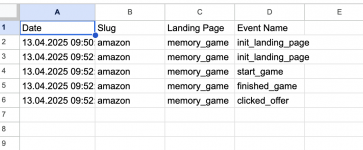
Another day, another Google Sheets script that I'm sharing  and will help you track events for free and optimize your landing pages. I did this because right now, on the same URL, I'm doing A/B testing of my landing pages, and they both weigh 50(50% chance to load each landing page). I wanted to see how many people visited a specific page, how many started/finished the game, and how many clicked the offer and which one to use. So, let's go straight to the point.
Step 1: Go to Google Sheets and create a new one with the desired name.
Step 2. Go to Extensions Apps Script and copy-paste the following code
What
and will help you track events for free and optimize your landing pages. I did this because right now, on the same URL, I'm doing A/B testing of my landing pages, and they both weigh 50(50% chance to load each landing page). I wanted to see how many people visited a specific page, how many started/finished the game, and how many clicked the offer and which one to use. So, let's go straight to the point.Step 1: Go to Google Sheets and create a new one with the desired name.
Step 2. Go to Extensions Apps Script and copy-paste the following code
JavaScript:
function doGet(e)  {
  const sheetName = e.parameter.sheet  || "DefaultSheet";  // Sheet name  from query param
  const name  = e.parameter.name || "Unnamed";
  const  lp = e.parameter.lp || "Unknown";
   const slug = e.parameter.slug || "N/A";         // Status from query param

   const spreadsheet = SpreadsheetApp.getActiveSpreadsheet();
  let  sheet = spreadsheet.getSheetByName(sheetName);

  // Create  sheet if it doesn't exist
   if (!sheet) {
     sheet = spreadsheet.insertSheet(sheetName);
     // Optionally, add header row
     sheet.appendRow(["Date", "Slug", "Landing Page",  "Event Name"]);
  }

  //  Append data to the sheet
   sheet.appendRow([
    new Date(),
     slug,
     lp,
    name
   ]);

  return ContentService.createTextOutput(`Saved to  sheet "${sheetName}"`);
}